


Art of Solitaire - Card Games
4.01.75K Reviews
App Specs
- Version
- 3.02.06
- Updated On
- License
- Free
- Downloads
- 1,000,000+
- Developer
- Flick Games - Solitaire & Patience Card Games
- Categories
- Card
- Platform
- Android
Screenshots
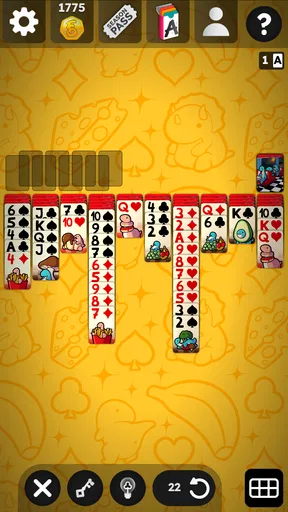
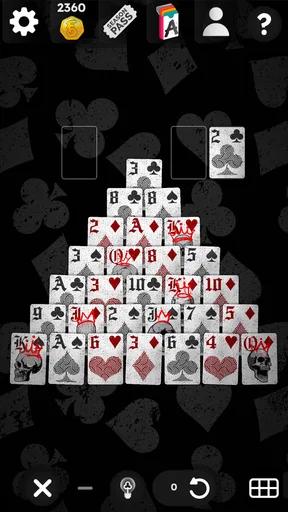
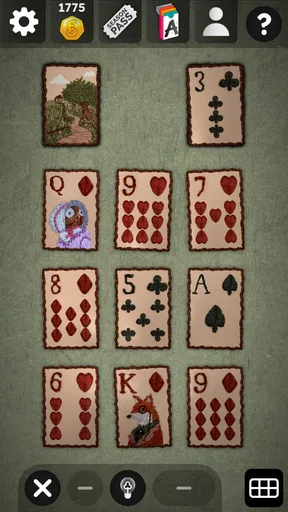
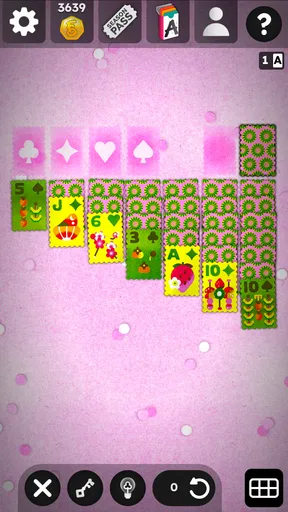
 Analysis by AppCompare
I usually turn to solitaire when I want something absorbing but not demanding. That is exactly where Art of Solitaire - Card Games fits best. It is a free card game from Flick Games - Solitaire & Patience Card Games, built around familiar patience formats but presented with enough variety to keep a short break from feeling repetitive. I found its most interesting quality in the way it brings several recognizable solitaire styles together instead of asking me to commit to only one.
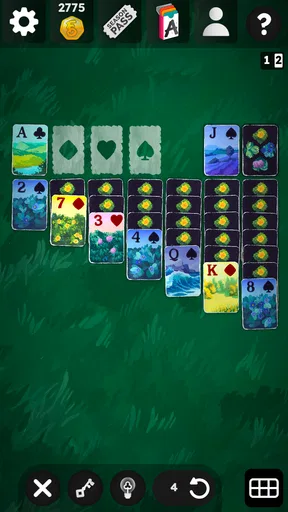
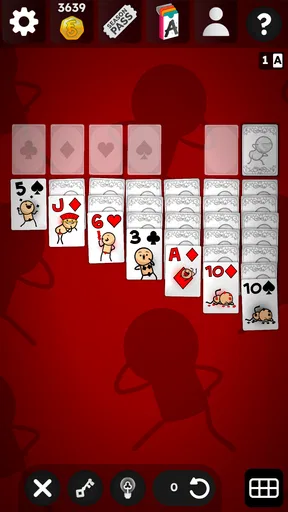
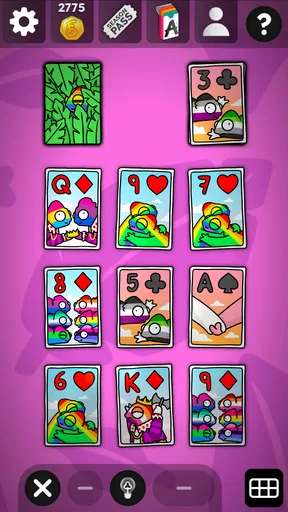
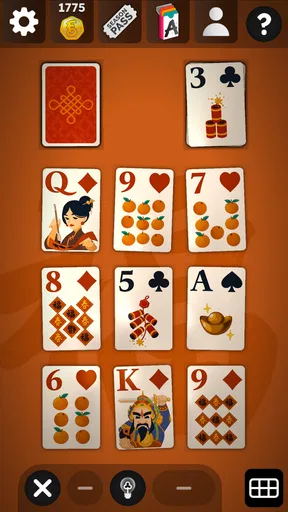
The central appeal is the selection itself: Klondike Solitaire, Spider, and Pyramid are all part of the package. Those games may share cards and a quiet pace, but they ask for different kinds of attention. Klondike rewards careful sequencing, Spider makes me think more seriously about suit management, and Pyramid is more about spotting useful combinations before the available cards disappear. That range gives the app a broader use than a single-format solitaire game.
I would describe it as a relaxed card game rather than a competitive challenge. The store summary also points to collaborations with Inscryption and Monument Valley, which gives the title a more distinctive identity than the plain solitaire apps that fill the same category. I would not choose it because I need a deep strategy game, but I would choose it when I want familiar rules with a more curated presentation.
Why the variety of solitaire formats matters
The strongest capability here is not simply having multiple games. It is the ability to switch between different mental rhythms without leaving the same app. When I have only a few minutes, Pyramid is a natural choice because its decisions feel immediate. When I want a longer, more methodical session, Spider gives me more to organize. Klondike sits between those extremes and remains the easiest starting point for someone who already knows classic solitaire.
That distinction matters in everyday use. A basic Klondike-only app can be perfectly pleasant, but it becomes less useful when I am tired of the same pattern. In this game, changing formats can refresh the experience without forcing me to learn an entirely new card title. The cards remain familiar, while the type of concentration changes.
For a new player, I would begin with Klondike rather than jumping straight into Spider. It gives a gentle introduction to moving cards, exposing hidden cards, and planning around the available columns. Once those habits feel natural, Spider becomes a better test of patience. Pyramid is useful when I want something that feels more like a quick visual puzzle than a long arrangement exercise.
The practical advantage is choice without cluttering my phone with separate solitaire apps. That sounds modest, but it changes how often I return. I can use one format for a quiet pause, another when I want more planning, and a third when I simply want to clear a few combinations quickly.
Worth Reading Before You Choose

EA SPORTS FC Mobile 26 Is a Bigger Football Game, but It Takes Time

Flipboard Shows What News Apps Must Do Beyond the Feed

Switching to Android Auto Means Rethinking Your Driving Routine

Google Calendar Makes a Crowded Week Easier to Manage

Ludo King Makes the Most of the Minutes Between Plans

Baby Panda World Brings Quick Play to Modern Phones, but Its Game Library Feels Busy
How the different modes change the way I play
Klondike is the familiar anchor. Its appeal comes from balancing visible moves with the uncertainty of cards that have not yet been revealed. I tend to play it when I want a recognizable routine, but I still try not to move cards automatically. A useful habit is to ask whether a move exposes a hidden card or opens a useful space, rather than making a move only because it is immediately available.
Spider feels less forgiving because the order of cards matters over a longer chain. I pay closer attention to keeping suits organized and avoid creating a messy column simply to gain a short-term move. That makes it a better choice when I want the game to hold my attention. It is also the mode I would skip if I were distracted, because casual tapping can leave the layout harder to recover.
Pyramid changes the tempo again. I look for pairs that remove cards while keeping an eye on what those removals reveal. The challenge is not just finding a legal pair; it is deciding whether using it now improves the remaining layout. I enjoy it as a short mental reset, although players who prefer long-term planning may find it less satisfying than Spider.
Moving among these formats is more valuable than simply counting them. Each one gives me a reason to open the app in a different mood. That makes the collection feel intentional rather than like several unrelated modes placed side by side.
What the collaborations add to the experience
The references to Inscryption and Monument Valley make the game stand out from a standard digital deck. I see that as an invitation to expect a more art-conscious presentation, not as a promise that this is a full adventure game or a replacement for either of those experiences. The important point is that the identity feels less anonymous than a generic solitaire utility.
For me, atmosphere matters most during repeated sessions. Solitaire has simple rules, so visual character can influence whether I keep using one app or move to another. A distinctive presentation makes the familiar formats feel more like a complete game. It does not change the underlying decisions, but it can make the routine more pleasant.
I would still keep expectations sensible. Anyone looking for the narrative depth or unusual mechanics associated with larger games should not install this expecting that kind of experience. The collaborations are part of the appeal around the card gameplay; they do not turn the app into a story-driven title.
Using it in a normal day
My favorite scenario for this kind of game is a waiting period with no reliable internet activity to follow: sitting before an appointment, taking a break between tasks, or winding down before sleep. I can start with Klondike, decide that I want more structure, and move to Spider without opening another app. That small decision saves friction and helps the game match the amount of attention I have available.
There is also a useful way to treat the modes as different break lengths. Pyramid suits a brief pause because I can focus on immediate pair choices. Klondike works when I have enough time to settle into a sequence. Spider is better when I want the session itself to be the activity rather than something I play while waiting for another task.
I would not recommend playing it during a moment when I need to monitor something important. Even relaxed solitaire can become absorbing once a layout starts to develop. The quiet design makes it easy to underestimate how much attention a difficult position requires, particularly in Spider.
One practical approach is to choose the mode before opening the game based on the kind of break I need. If I want to relax, I avoid treating every move as a test of perfect play. If I want a challenge, I slow down and protect future options. This prevents the app from becoming frustrating simply because I selected a mode that does not match my mood.
Small habits that make the card layouts easier
In Klondike, I try to prioritize moves that reveal hidden cards, but I do not sacrifice every useful sequence just to expose one card. A newly opened space can be valuable, especially when it allows a long descending run to move, yet an empty column is not automatically helpful if I have no suitable king to place there. Thinking about the next two moves is more useful than chasing the first legal move I see.
In Spider, I keep completed same-suit runs in mind while arranging the visible columns. Mixing suits may create temporary mobility, but it can also make a column difficult to unwind. When the layout becomes crowded, I prefer a move that preserves several future options over one that looks impressive but leaves a single blocked column.
In Pyramid, I avoid removing a pair merely because it is available. I first check whether one card is supporting another useful combination or whether the removal will expose a better route. This is where the mode becomes more thoughtful than a simple matching exercise. The best move is often the one that improves the next choice, not the one that clears the most cards immediately.
These habits are not hidden buttons or special systems. They are ways to get more from the specific formats included here. They also explain why the app can serve both casual players and people who enjoy refining their solitaire decisions.
Where the free model feels comfortable and where it deserves attention
The game is free to install, which makes it easy to try without committing money first. Its content rating is Everyone, so it is suitable for a broad audience from an age-rating perspective. That makes it a reasonable choice for families who want a quiet card game, although younger players may still need help learning why a move is useful rather than merely legal.
There are in-app purchases ranging from $0.99 to $34.99 per item. I would treat that as an important consideration before handing the phone to someone else, especially if the game is being used by a child. The free entry point is appealing, but the presence of optional purchases means I would check the device’s purchase controls and avoid assuming that every part of the experience is covered by the initial download.
The app has reached more than a million installs, with an average rating of 4.0 from around sixteen thousand ratings and about one thousand eight hundred written reviews. That suggests a substantial audience and a generally positive reception, while also leaving room for individual preferences to differ. I would read that as evidence that the concept works for many players, not as a guarantee that its presentation or pacing will suit everyone.
The current version is 3.02.06, and it requires Android 8.0 or later. For someone using an older Android phone, compatibility should be checked before planning around it. On a supported device, the main question is less about technical ambition and more about whether the combination of familiar solitaire rules and stylized presentation matches the way you like to play.
The biggest trade-off is focus. Because the app includes several formats, it is more flexible than a single-mode alternative, but it may feel less pure to someone who wants a minimal Klondike board and nothing else. Players who prefer a completely stripped-back interface might find the art direction unnecessary. I see it as a benefit when I want personality, but I understand why a traditionalist might choose a plainer app.
Another trade-off is depth. Spider can provide meaningful planning, yet the overall package remains approachable rather than built for serious competitive solitaire. If you want rankings, tournaments, detailed performance analysis, or a highly specialized challenge, a dedicated alternative may serve you better. This game is strongest as a polished collection for personal play, not as a serious training environment.
Who gets the most from this particular collection
I think the best audience is someone who already enjoys solitaire but wants more than one familiar format. The ability to move between Klondike, Spider, and Pyramid gives that player a reason to return without making the learning curve steep. It is also a good fit for people who care about visual identity and would rather use a game with a recognizable artistic angle than an interchangeable card utility.
It works well for short, self-contained sessions. There is no need to coordinate with other players, learn a large ruleset, or reserve a long block of time. That makes it suitable for commuting breaks, quiet evenings, and moments when I want a screen activity that is more engaging than scrolling but less demanding than a large strategy game.
I would be more cautious about recommending it to someone who dislikes card randomness or becomes annoyed when a layout develops badly. Solitaire always includes situations where careful play cannot guarantee a satisfying result. The different modes change the kind of decision-making, but they do not remove that basic uncertainty.
I would also point heavy puzzle fans toward a more specialized game if their priority is novelty. The appeal here comes from refining well-known card formats and presenting them with character. Someone seeking constant new mechanics, a campaign, or a strong narrative may quickly feel that the core loop is too familiar.
For a family device, the Everyone rating is reassuring, but I would still handle the purchase side responsibly because optional items are present. For an older Android handset, the Android 8.0 requirement is the practical checkpoint. For everyone else, the decision comes down to whether a multi-format solitaire collection is preferable to a single, ultra-simple alternative.
My recommendation after using the different rhythms
I recommend Art of Solitaire - Card Games to anyone who wants classic patience games with a stronger sense of presentation and enough variety to match different kinds of breaks. Its most convincing feature is the way Klondike, Spider, and Pyramid support different levels of attention inside one compact card experience. I can play casually, slow down for a more demanding layout, or switch formats when one style stops feeling fresh.
I would not call it the best choice for every solitaire player. A minimalist may prefer a plain Klondike app, while a competitive player may need deeper statistics or organized challenges. The optional purchases also deserve a little care, particularly on a shared device. Those are meaningful limitations, not reasons to dismiss the game.
For me, the balance is successful because the app understands what makes solitaire useful: it is familiar, flexible, and easy to fit around real life. The artistic identity gives the collection more personality, while the three main formats keep the gameplay from becoming a single repeated routine. If you want a free card game for quiet, independent sessions and appreciate having a choice between quick matching and slower planning, this is a thoughtful download to try.
Pros
- Smooth
- relaxing gameplay suitable for short or extended sessions.
- Includes multiple solitaire variations for added variety.
- Simple controls make card placement easy on mobile screens.
- Offline play is convenient when you have no internet connection.
- Helpful hints can assist players when they get stuck.
Cons
- Some features may require purchases or watching ads to unlock.
- Gameplay can feel repetitive after extended sessions.
- Limited social features for players who enjoy competition.
- Small cards may be harder to read on compact phone displays.
- Difficulty balance may not satisfy experienced solitaire players.
FAQs for Art of Solitaire - Card Games
What is Art of Solitaire - Card Games?
Art of Solitaire - Card Games is a relaxing digital solitaire experience built around classic card gameplay and artwork-inspired presentation. It is designed for short sessions as well as longer games, allowing players to enjoy familiar solitaire mechanics while exploring a visually polished interface. The app may include different layouts, challenges, themes, or progression features depending on the version available on your device.
Is Art of Solitaire - Card Games free to download and play?
The game can generally be downloaded without an upfront purchase, but the exact business model may include advertising, optional in-app purchases, or premium features. Some visual themes, extra content, or ad-free options may require payment. Before installing, check the current Google Play Store or App Store listing for pricing, subscriptions, supported purchases, and whether any advertised features are limited to the paid version.
Does the game work offline?
Art of Solitaire - Card Games is primarily a single-player card game, so the main solitaire experience may be available without a continuous internet connection. However, an internet connection could still be required for advertisements, analytics, cloud-related features, updates, daily challenges, or restoring purchases. If offline play is important to you, launch the game once while connected and test the available modes before relying on it during travel.
Is Art of Solitaire - Card Games suitable for beginners?
Yes, the game should be approachable for beginners who are new to digital solitaire, particularly if they already understand basic card movement and arranging rules. The familiar tap-and-drag controls make it easy to start playing, while hints, undo options, or guided interactions may help when available. Players should still review the rules for each included variation because not every solitaire mode follows the same objective.
What devices and permissions does the game require?
Compatibility depends on the current release and your operating system, so prospective players should confirm the minimum Android or iOS version shown on the official store page. Solitaire games typically need only standard app access, although advertising or optional services may request network-related permissions. Review the permissions and privacy information before downloading, especially if you prefer to limit tracking, personalized advertisements, or background data usage.


